# CUGA: The Configurable Generalist Agent
### Start with a generalist. Customize for your domain. Deploy faster!
Building a domain-specific enterprise agent from scratch is complex and requires significant effort: agent and tool orchestration, planning logic, safety and alignment policies, evaluation for performance/cost tradeoffs and ongoing improvements. CUGA is a state-of-the-art generalist agent designed with enterprise needs in mind, so you can focus on configuring your domain tools, policies and workflow.
---
[](https://huggingface.co/spaces/ibm-research/cuga-agent)
[](https://www.python.org/)
[]()
[](https://docs.cuga.dev)
[](https://discord.gg/aH6rAEEW)
[](https://appworld.dev/leaderboard)
[](https://docs.google.com/spreadsheets/d/1M801lEpBbKSNwP-vDBkC_pF7LdyGU1f_ufZb_NWNBZQ/edit?gid=0#gid=0)
## Why CUGA?
### 🏆 Benchmark Performance
CUGA achieves state-of-the-art performance on leading benchmarks:
- 🥇 **#1 on [AppWorld](https://appworld.dev/leaderboard)** — a benchmark with 750 real-world tasks across 457 APIs
- 🥈 **Top-tier on [WebArena](https://docs.google.com/spreadsheets/d/1M801lEpBbKSNwP-vDBkC_pF7LdyGU1f_ufZb_NWNBZQ/edit?gid=0#gid=0)** (#1 from 02/25 - 09/25) — a complex benchmark for autonomous web agents across application domains
### ✨ Key Features & Capabilities
- **High-performing generalist agent** — Benchmarked on complex web and API tasks. Combines best-of-breed agentic patterns (e.g. planner-executor, code-act) with structured planning and smart variable management to prevent hallucination and handle complexity
- **Configurable reasoning modes** — Balance performance and cost/latency with flexible modes ranging from fast heuristics to deep planning, optimizing for your specific task requirements
- **Flexible agent and tool integration** — Seamlessly integrate tools via OpenAPI specs, MCP servers, and Langchain, enabling rapid connection to REST APIs, custom protocols, and Python functions
- **Integrates with Langflow** — Low-code visual build experience for designing and deploying agent workflows without extensive coding
- **Open-source and composable** — Built with modularity in mind, CUGA itself can be exposed as a tool to other agents, enabling nested reasoning and multi-agent collaboration. Evolving toward enterprise-grade reliability
- **Configurable policy and human-in-the-loop instructions** _(Experimental)_ — Configure policy-aware instructions and approval gates to improve alignment and ensure safe agent behavior in enterprise contexts
- **Save-and-reuse capabilities** _(Experimental)_ — Capture and reuse successful execution paths (plans, code, and trajectories) for faster and consistent behavior across repeated tasks
Explore the [Roadmap](#roadmap) to see what's ahead, or join the [🤝 Call for the Community](#call-for-the-community) to get involved.
## 🎬 CUGA in Action
### Hybrid Task Execution
Watch CUGA seamlessly combine web and API operations in a single workflow:
**Example Task:** `get top account by revenue from digital sales, then add it to current page`
https://github.com/user-attachments/assets/0cef8264-8d50-46d9-871a-ab3cefe1dde5
Would you like to test this? (Advanced Demo)
Experience CUGA's hybrid capabilities by combining API calls with web interactions:
### Setup Steps:
1. **Switch to hybrid mode:**
```bash
# Edit ./src/cuga/settings.toml and change:
mode = 'hybrid' # under [advanced_features] section
```
2. **Install browser API support:**
- Installs playwright browser API and Chromium browser
- The `playwright` installer should already be included after installing with [Quick Start](#-quick-start)
```bash
playwright install chromium
```
3. **Start the demo:**
```bash
cuga start demo
```
4. **Enable the browser extension:**
- Click the extension puzzle icon in your browser
- Toggle the CUGA extension to activate it
- This will open the CUGA side panel
5. **Open the test application:**
- Navigate to: [Sales app](https://samimarreed.github.io/sales/)
6. **Try the hybrid task:**
```
get top account by revenue from digital sales then add it to current page
```
🎯 **What you'll see:** CUGA will fetch data from the Digital Sales API and then interact with the web page to add the account information directly to the current page - demonstrating seamless API-to-web workflow integration!
### Human in the Loop Task Execution
Watch CUGA pause for human approval during critical decision points:
**Example Task:** `get best accounts`
https://github.com/user-attachments/assets/d103c299-3280-495a-ba66-373e72554e78
Would you like to try this? (HITL Demo)
Experience CUGA's Human-in-the-Loop capabilities where the agent pauses for human approval at key decision points:
### Setup Steps:
1. **Enable HITL mode:**
```bash
# Edit ./src/cuga/settings.toml and ensure:
api_planner_hitl = true # under [advanced_features] section
```
2. **Start the demo:**
```bash
cuga start demo
```
3. **Try the HITL task:**
```
get best accounts
```
🎯 **What you'll see:** CUGA will pause at critical decision points, showing you the planned actions and waiting for your approval before proceeding.
## 🚀 Quick Start
📋 Prerequisites (click to expand)
- **Python 3.12+** - [Download here](https://www.python.org/downloads/)
- **uv package manager** - [Installation guide](https://docs.astral.sh/uv/getting-started/installation/)
🔧 Optional: Local Digital Sales API Setup (only if remote endpoint fails)
> The demo comes pre-configured with the Digital Sales API → [📖 API Docs](https://digitalsales.19pc1vtv090u.us-east.codeengine.appdomain.cloud/docs)
**Only follow these steps if you encounter issues with the remote Digital Sales endpoint:**
```bash
# Start the Digital Sales API locally on port 8000
uv run digital_sales_openapi
# Then update ./src/cuga/backend/tools_env/registry/config/mcp_servers.yaml to use localhost:
# Change the digital_sales URL from the remote endpoint to:
# http://localhost:8000
```
```bash
# In terminal, clone the repository and navigate into it
git clone https://github.com/cuga-project/cuga-agent.git
cd cuga-agent
# 1. Create and activate virtual environment
uv venv --python=3.12 && source .venv/bin/activate
# 2. Install dependencies
uv sync
# 3. Set up environment variables
# Create .env file with your API keys
echo "OPENAI_API_KEY=your-openai-api-key-here" > .env
# 4. Start the demo
cuga start demo
# Chrome will open automatically at https://localhost:7860
# then try sending your task to CUGA: 'get top account by revenue from digital sales'
# 5. View agent trajectories (optional)
cuga viz
# This launches a web-based dashboard for visualizing and analyzing
# agent execution trajectories, decision-making, and tool usage
```
🤖 LLM Configuration - Advanced Options
---
Refer to: [`.env.example`](.env.example) for detailed examples.
CUGA supports multiple LLM providers with flexible configuration options. You can configure models through TOML files or override specific settings using environment variables.
## Supported Platforms
- **OpenAI** - GPT models via OpenAI API (also supports LiteLLM via base URL override)
- **IBM WatsonX** - IBM's enterprise LLM platform
- **Azure OpenAI** - Microsoft's Azure OpenAI service
- **RITS** - Internal IBM research platform
- **OpenRouter** - LLM API gateway provider
## Configuration Priority
1. **Environment Variables** (highest priority)
2. **TOML Configuration** (medium priority)
3. **Default Values** (lowest priority)
### Option 1: OpenAI 🌐
**Setup Instructions:**
1. Create an account at [platform.openai.com](https://platform.openai.com)
2. Generate an API key from your [API keys page](https://platform.openai.com/api-keys)
3. Add to your `.env` file:
```env
# OpenAI Configuration
OPENAI_API_KEY=sk-...your-key-here...
AGENT_SETTING_CONFIG="settings.openai.toml"
# Optional overrides
MODEL_NAME=gpt-4o # Override model name
OPENAI_BASE_URL=https://api.openai.com/v1 # Override base URL
OPENAI_API_VERSION=2024-08-06 # Override API version
```
**Default Values:**
- Model: `gpt-4o`
- API Version: OpenAI's default API Version
- Base URL: OpenAI's default endpoint
### Option 2: IBM WatsonX 🔵
**Setup Instructions:**
1. Access [IBM WatsonX](https://www.ibm.com/watsonx)
2. Create a project and get your credentials:
- Project ID
- API Key
- Region/URL
3. Add to your `.env` file:
```env
# WatsonX Configuration
WATSONX_API_KEY=your-watsonx-api-key
WATSONX_PROJECT_ID=your-project-id
WATSONX_URL=https://us-south.ml.cloud.ibm.com # or your region
AGENT_SETTING_CONFIG="settings.watsonx.toml"
# Optional override
MODEL_NAME=meta-llama/llama-4-maverick-17b-128e-instruct-fp8 # Override model for all agents
```
**Default Values:**
- Model: `meta-llama/llama-4-maverick-17b-128e-instruct-fp8`
### Option 3: Azure OpenAI
**Setup Instructions:**
1. Add to your `.env` file:
```env
AGENT_SETTING_CONFIG="settings.azure.toml" # Default config uses ETE
AZURE_OPENAI_API_KEY=""
AZURE_OPENAI_ENDPOINT=""
OPENAI_API_VERSION="2024-08-01-preview"
```
### Option 4: LiteLLM Support
CUGA supports LiteLLM through the OpenAI configuration by overriding the base URL:
1. Add to your `.env` file:
```env
# LiteLLM Configuration (using OpenAI settings)
OPENAI_API_KEY=your-api-key
AGENT_SETTING_CONFIG="settings.openai.toml"
# Override for LiteLLM
MODEL_NAME=Azure/gpt-4o # Override model name
OPENAI_BASE_URL=https://your-litellm-endpoint.com # Override base URL
OPENAI_API_VERSION=2024-08-06 # Override API version
```
### Option 5: OpenRouter Support
**Setup Instructions:**
1. Create an account at [openrouter.ai](https://openrouter.ai)
2. Generate an API key from your account settings
3. Add to your `.env` file:
```env
# OpenRouter Configuration
OPENROUTER_API_KEY=your-openrouter-api-key
AGENT_SETTING_CONFIG="settings.openrouter.toml"
OPENROUTER_BASE_URL="https://openrouter.ai/api/v1"
# Optional override
MODEL_NAME=openai/gpt-4o # Override model name
```
## Configuration Files
CUGA uses TOML configuration files located in `src/cuga/configurations/models/`:
- `settings.openai.toml` - OpenAI configuration (also supports LiteLLM via base URL override)
- `settings.watsonx.toml` - WatsonX configuration
- `settings.azure.toml` - Azure OpenAI configuration
- `settings.openrouter.toml` - OpenRouter configuration
Each file contains agent-specific model settings that can be overridden by environment variables.
💡 **Tip:** Want to use your own tools or add your MCP tools? Check out [`src/cuga/backend/tools_env/registry/config/mcp_servers.yaml`](src/cuga/backend/tools_env/registry/config/mcp_servers.yaml) for examples of how to configure custom tools and APIs, including those for digital sales.
## Configurations
🔒 Running with a secure code sandbox
Cuga supports isolated code execution using Docker/Podman containers for enhanced security.
1. **Install container runtime**: Download and install [Rancher Desktop](https://rancherdesktop.io/) or Docker.
2. **Install sandbox dependencies**:
```bash
uv sync --group sandbox
```
3. **Start with remote sandbox enabled**:
```bash
cuga start demo --sandbox
```
This automatically configures Cuga to use Docker/Podman for code execution instead of local execution.
4. **Test your sandbox setup** (optional):
```bash
# Test local sandbox (default)
cuga test-sandbox
# Test remote sandbox with Docker/Podman
cuga test-sandbox --remote
```
You should see the output: `('test succeeded
', {})`
**Note**: Without the `--sandbox` flag, Cuga uses local Python execution (default), which is faster but provides less isolation.
⚙️ Reasoning modes - Switch between Fast/Balanced/Accurate modes
## Available Modes under `./src/cuga`
| Mode | File | Description |
| ---------- | -------------------------------------- | ----------------------------------------------- |
| `fast` | `./configurations/modes/fast.toml` | Optimized for speed |
| `balanced` | `./configurations/modes/balanced.toml` | Balance between speed and precision _(default)_ |
| `accurate` | `./configurations/modes/accurate.toml` | Optimized for precision |
| `custom` | `./configurations/modes/custom.toml` | User-defined settings |
## Configuration
```
configurations/
├── modes/fast.toml
├── modes/balanced.toml
├── modes/accurate.toml
└── modes/custom.toml
```
Edit `settings.toml`:
```toml
[features]
cuga_mode = "fast" # or "balanced" or "accurate" or "custom"
```
**Documentation:** [./docs/flags.html](./docs/flags.html)
🎯 Task Mode Configuration - Switch between API/Web/Hybrid modes
## Available Task Modes
| Mode | Description |
| -------- | --------------------------------------------------------------------------- |
| `api` | API-only mode - executes API tasks _(default)_ |
| `web` | Web-only mode - executes web tasks using browser extension |
| `hybrid` | Hybrid mode - executes both API tasks and web tasks using browser extension |
## How Task Modes Work
### API Mode (`mode = 'api'`)
- Opens tasks in a regular web browser
- Best for API/Tools-focused workflows and testing
### Web Mode (`mode = 'web'`)
- Interface inside a browser extension (available next to browser)
- Optimized for web-specific tasks and interactions
- Direct access to web page content and controls
### Hybrid Mode (`mode = 'hybrid'`)
- Opens inside browser extension like web mode
- Can execute both API/Tools tasks and web page tasks simultaneously
- Starts from configurable URL defined in `demo_mode.start_url`
- Most versatile mode for complex workflows combining web and API operations
## Configuration
Edit `./src/cuga/settings.toml`:
```toml
[demo_mode]
start_url = "https://opensource-demo.orangehrmlive.com/web/index.php/auth/login" # Starting URL for hybrid mode
[advanced_features]
mode = 'api' # 'api', 'web', or 'hybrid'
```
📝 Special Instructions Configuration
## How It Works
Each `.md` file contains specialized instructions that are automatically integrated into the CUGA's internal prompts when that component is active. Simply edit the markdown files to customize behavior for each node type.
**Available instruction sets:** `answer`, `api_planner`, `code_agent`, `plan_controller`, `reflection`, `shortlister`, `task_decomposition`
## Configuration
```
configurations/
└── instructions/
├── instructions.toml
├── default/
│ ├── answer.md
│ ├── api_planner.md
│ ├── code_agent.md
│ ├── plan_controller.md
│ ├── reflection.md
│ ├── shortlister.md
│ └── task_decomposition.md
└── [other instruction sets]/
```
Edit `configurations/instructions/instructions.toml`:
```toml
[instructions]
instruction_set = "default" # or any instruction set above
```
📹 Optional: Run with memory
1. Install memory dependencies `uv sync --group memory`
1. Change `enable_memory = true` in `setting.toml`
2. Run `cuga start memory`
Watch CUGA with Memory enabled
[LINK]
Would you like to test this? (Advanced Demo)
### Setup Steps:
1. set `enable_memory` flag to true
2. Run `cuga start memory`
3. Run `cuga start demo_crm --sample-memory-data`
4. go to the cuga webpage and type `Identify the common cities between my cuga_workspace/cities.txt and cuga_workspace/company.txt` . Here you should see the errors related to CodeAgent. Wait for a minute for `tips` to be generated. `Tips` generation can be confirmed from the terminal where` cuga start memory` was run
5. Re-run the same utterance again and it should finish in lesser number of steps
## 🔧 Advanced Usage
💾 Save & Reuse
## Setup
• Change `./src/cuga/settings.toml`: `cuga_mode = "save_reuse_fast"`
• Run: `cuga start demo`
## Demo Steps
• **First run**: `get top account by revenue`
- This is a new flow (first time)
- Wait for task to finish
- Approve to save the workflow
- Provide another example to help generalization of flow e.g. `get top 2 accounts by revenue`
• **Flow now will be saved**:
- May take some time
- Flow will be successfully saved
• **Verify reuse**: `get top 4 accounts by revenue`
- Should run faster using saved workflow
🔧 Adding Tools: Comprehensive Examples
CUGA supports three types of tool integrations. Each approach has its own use cases and benefits:
## 📋 **Tool Types Overview**
| Tool Type | Best For | Configuration | Runtime Loading |
| ------------- | -------------------------------------- | ------------------ | --------------- |
| **OpenAPI** | REST APIs, existing services | `mcp_servers.yaml` | ✅ Build |
| **MCP** | Custom protocols, complex integrations | `mcp_servers.yaml` | ✅ Build |
| **LangChain** | Python functions, rapid prototyping | Direct import | ✅ Runtime |
## 📚 **Additional Resources**
- **Tool Registry**: [./src/cuga/backend/tools_env/registry/README.md](./src/cuga/backend/tools_env/registry/README.md)
- **Comprehensive example with different tools + MCP**: [./docs/examples/cuga_with_runtime_tools/README.md](Adding Tools)
- **CUGA as MCP**: [./docs/examples/cuga_as_mcp/README.md](docs/examples/cuga_as_mcp)
### Test Scenarios - E2E
The test suite covers various execution modes across different scenarios:
| Scenario | Fast Mode | Balanced Mode | Accurate Mode | Save & Reuse Mode |
| ------------------------------------- | --------- | ------------- | ------------- | ----------------- |
| **Find VP Sales High-Value Accounts** | ✓ | ✓ | ✓ | - |
| **Get top account by revenue** | ✓ | ✓ | ✓ | ✓ |
| **List my accounts** | ✓ | ✓ | ✓ | - |
### Additional Test Categories
**Unit Tests**
- Variables Manager: Core functionality, metadata handling, singleton pattern, reset operations
- Value Preview: Intelligent truncation, nested structure preservation, length-aware formatting
**Integration Tests**
- API Response Handling: Error cases, validation, timeout scenarios, parameter extraction
- Registry Services: OpenAPI integration, MCP server functionality, mixed service configurations
- Tool Environment: Service loading, parameter handling, function calling, isolation testing
## 🧪 Running Tests
Focused suites:
```bash
./src/scripts/run_tests.sh
```
## 📊 Evaluation
For information on how to evaluate, see the [CUGA Evaluation Documentation](src/cuga/evaluation/README.md)
## 📚 Resources
- 📖 [Example applications](./docs/examples)
- 📧 Contact: [CUGA Team](https://forms.office.com/pages/responsepage.aspx?id=V3D2_MlQ1EqY8__KZK3Z6UtMUa14uFNMi1EyUFiZFGRUQklOQThLRjlYMFM2R1dYTk5GVTFMRzNZVi4u&route=shorturl)
## Call for the Community
CUGA is open source because we believe **trustworthy enterprise agents must be built together**.
Here's how you can help:
- **Share use cases** → Show us how you'd use CUGA in real workflows.
- **Request features** → Suggest capabilities that would make it more useful.
- **Report bugs** → Help improve stability by filing clear, reproducible reports.
All contributions are welcome through [GitHub Issues](../../issues/new/choose) - whether it's sharing use cases, requesting features, or reporting bugs!
## Roadmap
Amongst other, we're exploring the following directions:
- **Policy support**: procedural SOPs, domain knowledge, input/output guards, context- and tool-based constraints
- **Performance improvements**: dynamic reasoning strategies that adapt to task complexity
### Before Submitting a PR
Please follow the contribution guide in [CONTRIBUTING.md](CONTRIBUTING.md).
---
[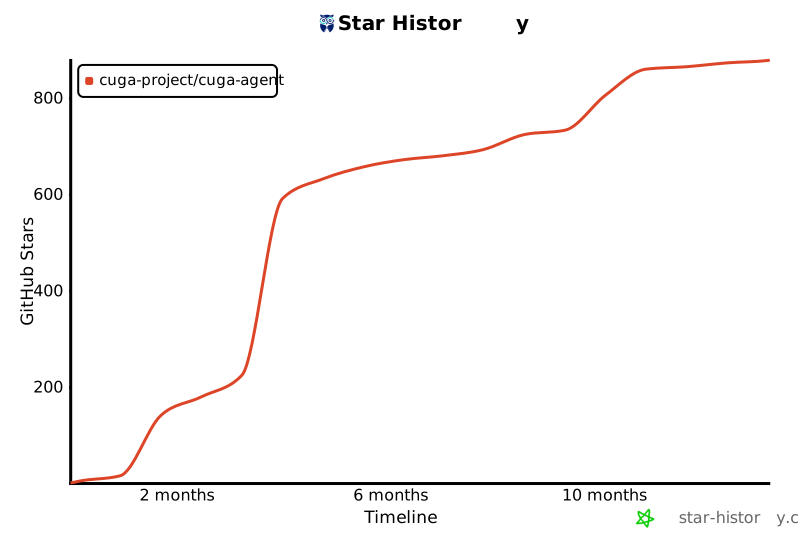](https://star-history.com/#cuga-project/cuga-agent&Date)
## Contributors
[](https://github.com/cuga-project/cuga-agent/graphs/contributors)
