
Spaces:
Running

Running
File size: 22,833 Bytes
3289c58 |
1 2 3 4 5 6 7 8 9 10 11 12 13 14 15 16 17 18 19 20 21 22 23 24 25 26 27 28 29 30 31 32 33 34 35 36 37 38 39 40 41 42 43 44 45 46 47 48 49 50 51 52 53 54 55 56 57 58 59 60 61 62 63 64 65 66 67 68 69 70 71 72 73 74 75 76 77 78 79 80 81 82 83 84 85 86 87 88 89 90 91 92 93 94 95 96 97 98 99 100 101 102 103 104 105 106 107 108 109 110 111 112 113 114 115 116 117 118 119 120 121 122 123 124 125 126 127 128 129 130 131 132 133 134 135 136 137 138 139 140 141 142 143 144 145 146 147 148 149 150 151 152 153 154 155 156 157 158 159 160 161 162 163 164 165 166 167 168 169 170 171 172 173 174 175 176 177 178 179 180 181 182 183 184 185 186 187 188 189 190 191 192 193 194 195 196 197 198 199 200 201 202 203 204 205 206 207 208 209 210 211 212 213 214 215 216 217 218 219 220 221 222 223 224 225 226 227 228 229 230 231 232 233 234 235 236 237 238 239 240 241 242 243 244 245 246 247 248 249 250 251 252 253 254 255 256 257 258 259 260 261 262 263 264 265 266 267 268 269 270 271 272 273 274 275 276 277 278 279 280 281 282 283 284 285 286 287 288 289 290 291 292 293 294 295 296 297 298 299 300 301 302 303 304 305 306 307 308 309 310 311 312 313 314 315 316 317 318 319 320 321 322 323 324 325 326 327 328 329 330 331 332 333 334 335 336 337 338 339 340 341 342 343 344 345 346 347 348 349 350 351 352 353 354 355 356 357 358 359 360 361 362 363 364 365 366 367 368 369 370 371 372 373 374 375 376 377 378 379 380 381 382 383 384 385 386 387 388 389 390 391 392 393 394 395 396 397 398 399 400 401 402 403 404 405 406 407 408 409 410 411 412 413 414 415 416 417 418 419 420 421 422 423 424 425 426 427 428 429 430 431 432 433 434 435 436 437 438 439 440 441 442 443 444 445 446 447 448 449 450 451 452 453 454 455 456 457 458 459 460 461 462 463 464 465 466 467 468 469 470 471 472 473 474 475 476 477 478 479 480 481 482 483 484 485 486 487 488 489 490 491 492 493 494 495 496 497 498 499 500 501 502 503 504 505 506 507 508 509 510 511 512 513 514 515 516 517 518 519 520 521 522 523 524 525 526 527 528 529 530 531 532 533 534 535 536 537 538 539 540 541 542 543 544 545 546 547 548 549 550 551 552 553 554 555 556 557 558 559 560 561 562 563 564 565 566 567 568 569 570 571 572 573 574 575 576 577 578 579 580 581 582 583 584 585 586 587 588 589 590 591 592 593 594 595 596 597 598 599 600 601 602 603 604 605 606 607 608 609 610 611 612 613 614 615 616 617 618 619 620 621 622 623 624 625 626 627 628 629 630 631 632 633 634 635 636 637 638 639 640 641 642 643 644 645 646 647 648 649 650 651 652 653 654 655 656 657 658 |
---
title: CUGA Agent
emoji: 🤖
colorFrom: purple
colorTo: blue
sdk: docker
sdk_version: "4.36"
app_file: app.py
pinned: false
app_port: 7860
description: Configurable Generalist Agent, leader in AppWorld Benchmark
short_description: Configurable Generalist Agent, leader in AppWorld Benchmark
---
<picture>
<source media="(prefers-color-scheme: dark)" srcset="/docs/images/cuga-dark.png">
<source media="(prefers-color-scheme: light)" srcset="/docs/images/cuga-light.png">
<img alt="CUGA" src="/docs/images/cuga-dark.png">
</picture>
<div align="center">
# CUGA: The Configurable Generalist Agent
### Start with a generalist. Customize for your domain. Deploy faster!
Building a domain-specific enterprise agent from scratch is complex and requires significant effort: agent and tool orchestration, planning logic, safety and alignment policies, evaluation for performance/cost tradeoffs and ongoing improvements. CUGA is a state-of-the-art generalist agent designed with enterprise needs in mind, so you can focus on configuring your domain tools, policies and workflow.
---
[](https://huggingface.co/spaces/ibm-research/cuga-agent)
[](https://www.python.org/)
[]()
[](https://docs.cuga.dev)
[](https://discord.gg/aH6rAEEW)
[](https://appworld.dev/leaderboard)
[](https://docs.google.com/spreadsheets/d/1M801lEpBbKSNwP-vDBkC_pF7LdyGU1f_ufZb_NWNBZQ/edit?gid=0#gid=0)
</div>
## Why CUGA?
### 🏆 Benchmark Performance
CUGA achieves state-of-the-art performance on leading benchmarks:
- 🥇 **#1 on [AppWorld](https://appworld.dev/leaderboard)** — a benchmark with 750 real-world tasks across 457 APIs
- 🥈 **Top-tier on [WebArena](https://docs.google.com/spreadsheets/d/1M801lEpBbKSNwP-vDBkC_pF7LdyGU1f_ufZb_NWNBZQ/edit?gid=0#gid=0)** (#1 from 02/25 - 09/25) — a complex benchmark for autonomous web agents across application domains
### ✨ Key Features & Capabilities
- **High-performing generalist agent** — Benchmarked on complex web and API tasks. Combines best-of-breed agentic patterns (e.g. planner-executor, code-act) with structured planning and smart variable management to prevent hallucination and handle complexity
- **Configurable reasoning modes** — Balance performance and cost/latency with flexible modes ranging from fast heuristics to deep planning, optimizing for your specific task requirements
- **Flexible agent and tool integration** — Seamlessly integrate tools via OpenAPI specs, MCP servers, and Langchain, enabling rapid connection to REST APIs, custom protocols, and Python functions
- **Integrates with Langflow** — Low-code visual build experience for designing and deploying agent workflows without extensive coding
- **Open-source and composable** — Built with modularity in mind, CUGA itself can be exposed as a tool to other agents, enabling nested reasoning and multi-agent collaboration. Evolving toward enterprise-grade reliability
- **Configurable policy and human-in-the-loop instructions** _(Experimental)_ — Configure policy-aware instructions and approval gates to improve alignment and ensure safe agent behavior in enterprise contexts
- **Save-and-reuse capabilities** _(Experimental)_ — Capture and reuse successful execution paths (plans, code, and trajectories) for faster and consistent behavior across repeated tasks
Explore the [Roadmap](#roadmap) to see what's ahead, or join the [🤝 Call for the Community](#call-for-the-community) to get involved.
## 🎬 CUGA in Action
### Hybrid Task Execution
Watch CUGA seamlessly combine web and API operations in a single workflow:
**Example Task:** `get top account by revenue from digital sales, then add it to current page`
https://github.com/user-attachments/assets/0cef8264-8d50-46d9-871a-ab3cefe1dde5
<details>
<summary><b>Would you like to test this? (Advanced Demo)</b></summary>
Experience CUGA's hybrid capabilities by combining API calls with web interactions:
### Setup Steps:
1. **Switch to hybrid mode:**
```bash
# Edit ./src/cuga/settings.toml and change:
mode = 'hybrid' # under [advanced_features] section
```
2. **Install browser API support:**
- Installs playwright browser API and Chromium browser
- The `playwright` installer should already be included after installing with [Quick Start](#-quick-start)
```bash
playwright install chromium
```
3. **Start the demo:**
```bash
cuga start demo
```
4. **Enable the browser extension:**
- Click the extension puzzle icon in your browser
- Toggle the CUGA extension to activate it
- This will open the CUGA side panel
5. **Open the test application:**
- Navigate to: [Sales app](https://samimarreed.github.io/sales/)
6. **Try the hybrid task:**
```
get top account by revenue from digital sales then add it to current page
```
🎯 **What you'll see:** CUGA will fetch data from the Digital Sales API and then interact with the web page to add the account information directly to the current page - demonstrating seamless API-to-web workflow integration!
</details>
### Human in the Loop Task Execution
Watch CUGA pause for human approval during critical decision points:
**Example Task:** `get best accounts`
https://github.com/user-attachments/assets/d103c299-3280-495a-ba66-373e72554e78
<details>
<summary><b>Would you like to try this? (HITL Demo)</b></summary>
Experience CUGA's Human-in-the-Loop capabilities where the agent pauses for human approval at key decision points:
### Setup Steps:
1. **Enable HITL mode:**
```bash
# Edit ./src/cuga/settings.toml and ensure:
api_planner_hitl = true # under [advanced_features] section
```
2. **Start the demo:**
```bash
cuga start demo
```
3. **Try the HITL task:**
```
get best accounts
```
🎯 **What you'll see:** CUGA will pause at critical decision points, showing you the planned actions and waiting for your approval before proceeding.
</details>
## 🚀 Quick Start
<details>
<summary><em style="color: #666;">📋 Prerequisites (click to expand)</em></summary>
- **Python 3.12+** - [Download here](https://www.python.org/downloads/)
- **uv package manager** - [Installation guide](https://docs.astral.sh/uv/getting-started/installation/)
</details>
<details>
<summary><em style="color: #666;">🔧 Optional: Local Digital Sales API Setup (only if remote endpoint fails)</em></summary>
> The demo comes pre-configured with the Digital Sales API → [📖 API Docs](https://digitalsales.19pc1vtv090u.us-east.codeengine.appdomain.cloud/docs)
**Only follow these steps if you encounter issues with the remote Digital Sales endpoint:**
```bash
# Start the Digital Sales API locally on port 8000
uv run digital_sales_openapi
# Then update ./src/cuga/backend/tools_env/registry/config/mcp_servers.yaml to use localhost:
# Change the digital_sales URL from the remote endpoint to:
# http://localhost:8000
```
</details>
```bash
# In terminal, clone the repository and navigate into it
git clone https://github.com/cuga-project/cuga-agent.git
cd cuga-agent
# 1. Create and activate virtual environment
uv venv --python=3.12 && source .venv/bin/activate
# 2. Install dependencies
uv sync
# 3. Set up environment variables
# Create .env file with your API keys
echo "OPENAI_API_KEY=your-openai-api-key-here" > .env
# 4. Start the demo
cuga start demo
# Chrome will open automatically at https://localhost:7860
# then try sending your task to CUGA: 'get top account by revenue from digital sales'
# 5. View agent trajectories (optional)
cuga viz
# This launches a web-based dashboard for visualizing and analyzing
# agent execution trajectories, decision-making, and tool usage
```
<details>
<summary>🤖 LLM Configuration - Advanced Options</summary>
---
Refer to: [`.env.example`](.env.example) for detailed examples.
CUGA supports multiple LLM providers with flexible configuration options. You can configure models through TOML files or override specific settings using environment variables.
## Supported Platforms
- **OpenAI** - GPT models via OpenAI API (also supports LiteLLM via base URL override)
- **IBM WatsonX** - IBM's enterprise LLM platform
- **Azure OpenAI** - Microsoft's Azure OpenAI service
- **RITS** - Internal IBM research platform
- **OpenRouter** - LLM API gateway provider
## Configuration Priority
1. **Environment Variables** (highest priority)
2. **TOML Configuration** (medium priority)
3. **Default Values** (lowest priority)
### Option 1: OpenAI 🌐
**Setup Instructions:**
1. Create an account at [platform.openai.com](https://platform.openai.com)
2. Generate an API key from your [API keys page](https://platform.openai.com/api-keys)
3. Add to your `.env` file:
```env
# OpenAI Configuration
OPENAI_API_KEY=sk-...your-key-here...
AGENT_SETTING_CONFIG="settings.openai.toml"
# Optional overrides
MODEL_NAME=gpt-4o # Override model name
OPENAI_BASE_URL=https://api.openai.com/v1 # Override base URL
OPENAI_API_VERSION=2024-08-06 # Override API version
```
**Default Values:**
- Model: `gpt-4o`
- API Version: OpenAI's default API Version
- Base URL: OpenAI's default endpoint
### Option 2: IBM WatsonX 🔵
**Setup Instructions:**
1. Access [IBM WatsonX](https://www.ibm.com/watsonx)
2. Create a project and get your credentials:
- Project ID
- API Key
- Region/URL
3. Add to your `.env` file:
```env
# WatsonX Configuration
WATSONX_API_KEY=your-watsonx-api-key
WATSONX_PROJECT_ID=your-project-id
WATSONX_URL=https://us-south.ml.cloud.ibm.com # or your region
AGENT_SETTING_CONFIG="settings.watsonx.toml"
# Optional override
MODEL_NAME=meta-llama/llama-4-maverick-17b-128e-instruct-fp8 # Override model for all agents
```
**Default Values:**
- Model: `meta-llama/llama-4-maverick-17b-128e-instruct-fp8`
### Option 3: Azure OpenAI
**Setup Instructions:**
1. Add to your `.env` file:
```env
AGENT_SETTING_CONFIG="settings.azure.toml" # Default config uses ETE
AZURE_OPENAI_API_KEY="<your azure apikey>"
AZURE_OPENAI_ENDPOINT="<your azure endpoint>"
OPENAI_API_VERSION="2024-08-01-preview"
```
### Option 4: LiteLLM Support
CUGA supports LiteLLM through the OpenAI configuration by overriding the base URL:
1. Add to your `.env` file:
```env
# LiteLLM Configuration (using OpenAI settings)
OPENAI_API_KEY=your-api-key
AGENT_SETTING_CONFIG="settings.openai.toml"
# Override for LiteLLM
MODEL_NAME=Azure/gpt-4o # Override model name
OPENAI_BASE_URL=https://your-litellm-endpoint.com # Override base URL
OPENAI_API_VERSION=2024-08-06 # Override API version
```
### Option 5: OpenRouter Support
**Setup Instructions:**
1. Create an account at [openrouter.ai](https://openrouter.ai)
2. Generate an API key from your account settings
3. Add to your `.env` file:
```env
# OpenRouter Configuration
OPENROUTER_API_KEY=your-openrouter-api-key
AGENT_SETTING_CONFIG="settings.openrouter.toml"
OPENROUTER_BASE_URL="https://openrouter.ai/api/v1"
# Optional override
MODEL_NAME=openai/gpt-4o # Override model name
```
## Configuration Files
CUGA uses TOML configuration files located in `src/cuga/configurations/models/`:
- `settings.openai.toml` - OpenAI configuration (also supports LiteLLM via base URL override)
- `settings.watsonx.toml` - WatsonX configuration
- `settings.azure.toml` - Azure OpenAI configuration
- `settings.openrouter.toml` - OpenRouter configuration
Each file contains agent-specific model settings that can be overridden by environment variables.
</details>
<div style="margin: 20px 0; padding: 15px; border-left: 4px solid #2196F3; border-radius: 4px;">
💡 **Tip:** Want to use your own tools or add your MCP tools? Check out [`src/cuga/backend/tools_env/registry/config/mcp_servers.yaml`](src/cuga/backend/tools_env/registry/config/mcp_servers.yaml) for examples of how to configure custom tools and APIs, including those for digital sales.
</div>
## Configurations
<details>
<summary>🔒 Running with a secure code sandbox</summary>
Cuga supports isolated code execution using Docker/Podman containers for enhanced security.
1. **Install container runtime**: Download and install [Rancher Desktop](https://rancherdesktop.io/) or Docker.
2. **Install sandbox dependencies**:
```bash
uv sync --group sandbox
```
3. **Start with remote sandbox enabled**:
```bash
cuga start demo --sandbox
```
This automatically configures Cuga to use Docker/Podman for code execution instead of local execution.
4. **Test your sandbox setup** (optional):
```bash
# Test local sandbox (default)
cuga test-sandbox
# Test remote sandbox with Docker/Podman
cuga test-sandbox --remote
```
You should see the output: `('test succeeded
', {})`
**Note**: Without the `--sandbox` flag, Cuga uses local Python execution (default), which is faster but provides less isolation.
</details>
<details>
<summary>⚙️ Reasoning modes - Switch between Fast/Balanced/Accurate modes</summary>
## Available Modes under `./src/cuga`
| Mode | File | Description |
| ---------- | -------------------------------------- | ----------------------------------------------- |
| `fast` | `./configurations/modes/fast.toml` | Optimized for speed |
| `balanced` | `./configurations/modes/balanced.toml` | Balance between speed and precision _(default)_ |
| `accurate` | `./configurations/modes/accurate.toml` | Optimized for precision |
| `custom` | `./configurations/modes/custom.toml` | User-defined settings |
## Configuration
```
configurations/
├── modes/fast.toml
├── modes/balanced.toml
├── modes/accurate.toml
└── modes/custom.toml
```
Edit `settings.toml`:
```toml
[features]
cuga_mode = "fast" # or "balanced" or "accurate" or "custom"
```
**Documentation:** [./docs/flags.html](./docs/flags.html)
</details>
<details>
<summary>🎯 Task Mode Configuration - Switch between API/Web/Hybrid modes</summary>
## Available Task Modes
| Mode | Description |
| -------- | --------------------------------------------------------------------------- |
| `api` | API-only mode - executes API tasks _(default)_ |
| `web` | Web-only mode - executes web tasks using browser extension |
| `hybrid` | Hybrid mode - executes both API tasks and web tasks using browser extension |
## How Task Modes Work
### API Mode (`mode = 'api'`)
- Opens tasks in a regular web browser
- Best for API/Tools-focused workflows and testing
### Web Mode (`mode = 'web'`)
- Interface inside a browser extension (available next to browser)
- Optimized for web-specific tasks and interactions
- Direct access to web page content and controls
### Hybrid Mode (`mode = 'hybrid'`)
- Opens inside browser extension like web mode
- Can execute both API/Tools tasks and web page tasks simultaneously
- Starts from configurable URL defined in `demo_mode.start_url`
- Most versatile mode for complex workflows combining web and API operations
## Configuration
Edit `./src/cuga/settings.toml`:
```toml
[demo_mode]
start_url = "https://opensource-demo.orangehrmlive.com/web/index.php/auth/login" # Starting URL for hybrid mode
[advanced_features]
mode = 'api' # 'api', 'web', or 'hybrid'
```
</details>
<details>
<summary>📝 Special Instructions Configuration</summary>
## How It Works
Each `.md` file contains specialized instructions that are automatically integrated into the CUGA's internal prompts when that component is active. Simply edit the markdown files to customize behavior for each node type.
**Available instruction sets:** `answer`, `api_planner`, `code_agent`, `plan_controller`, `reflection`, `shortlister`, `task_decomposition`
## Configuration
```
configurations/
└── instructions/
├── instructions.toml
├── default/
│ ├── answer.md
│ ├── api_planner.md
│ ├── code_agent.md
│ ├── plan_controller.md
│ ├── reflection.md
│ ├── shortlister.md
│ └── task_decomposition.md
└── [other instruction sets]/
```
Edit `configurations/instructions/instructions.toml`:
```toml
[instructions]
instruction_set = "default" # or any instruction set above
```
</details>
<details>
<summary><em style="color: #666;"> 📹 Optional: Run with memory</em></summary>
1. Install memory dependencies `uv sync --group memory`
1. Change `enable_memory = true` in `setting.toml`
2. Run `cuga start memory`
Watch CUGA with Memory enabled
[LINK]
<b>Would you like to test this? (Advanced Demo)</b>
### Setup Steps:
1. set `enable_memory` flag to true
2. Run `cuga start memory`
3. Run `cuga start demo_crm --sample-memory-data`
4. go to the cuga webpage and type `Identify the common cities between my cuga_workspace/cities.txt and cuga_workspace/company.txt` . Here you should see the errors related to CodeAgent. Wait for a minute for `tips` to be generated. `Tips` generation can be confirmed from the terminal where` cuga start memory` was run
5. Re-run the same utterance again and it should finish in lesser number of steps
</details>
## 🔧 Advanced Usage
<details>
<summary><b>💾 Save & Reuse</b></summary>
## Setup
• Change `./src/cuga/settings.toml`: `cuga_mode = "save_reuse_fast"`
• Run: `cuga start demo`
## Demo Steps
• **First run**: `get top account by revenue`
- This is a new flow (first time)
- Wait for task to finish
- Approve to save the workflow
- Provide another example to help generalization of flow e.g. `get top 2 accounts by revenue`
• **Flow now will be saved**:
- May take some time
- Flow will be successfully saved
• **Verify reuse**: `get top 4 accounts by revenue`
- Should run faster using saved workflow
</details>
<details>
<summary><b>🔧 Adding Tools: Comprehensive Examples</b></summary>
CUGA supports three types of tool integrations. Each approach has its own use cases and benefits:
## 📋 **Tool Types Overview**
| Tool Type | Best For | Configuration | Runtime Loading |
| ------------- | -------------------------------------- | ------------------ | --------------- |
| **OpenAPI** | REST APIs, existing services | `mcp_servers.yaml` | ✅ Build |
| **MCP** | Custom protocols, complex integrations | `mcp_servers.yaml` | ✅ Build |
| **LangChain** | Python functions, rapid prototyping | Direct import | ✅ Runtime |
## 📚 **Additional Resources**
- **Tool Registry**: [./src/cuga/backend/tools_env/registry/README.md](./src/cuga/backend/tools_env/registry/README.md)
- **Comprehensive example with different tools + MCP**: [./docs/examples/cuga_with_runtime_tools/README.md](Adding Tools)
- **CUGA as MCP**: [./docs/examples/cuga_as_mcp/README.md](docs/examples/cuga_as_mcp)
</details>
### Test Scenarios - E2E
The test suite covers various execution modes across different scenarios:
| Scenario | Fast Mode | Balanced Mode | Accurate Mode | Save & Reuse Mode |
| ------------------------------------- | --------- | ------------- | ------------- | ----------------- |
| **Find VP Sales High-Value Accounts** | ✓ | ✓ | ✓ | - |
| **Get top account by revenue** | ✓ | ✓ | ✓ | ✓ |
| **List my accounts** | ✓ | ✓ | ✓ | - |
### Additional Test Categories
**Unit Tests**
- Variables Manager: Core functionality, metadata handling, singleton pattern, reset operations
- Value Preview: Intelligent truncation, nested structure preservation, length-aware formatting
**Integration Tests**
- API Response Handling: Error cases, validation, timeout scenarios, parameter extraction
- Registry Services: OpenAPI integration, MCP server functionality, mixed service configurations
- Tool Environment: Service loading, parameter handling, function calling, isolation testing
## 🧪 Running Tests
Focused suites:
```bash
./src/scripts/run_tests.sh
```
## 📊 Evaluation
For information on how to evaluate, see the [CUGA Evaluation Documentation](src/cuga/evaluation/README.md)
## 📚 Resources
- 📖 [Example applications](./docs/examples)
- 📧 Contact: [CUGA Team](https://forms.office.com/pages/responsepage.aspx?id=V3D2_MlQ1EqY8__KZK3Z6UtMUa14uFNMi1EyUFiZFGRUQklOQThLRjlYMFM2R1dYTk5GVTFMRzNZVi4u&route=shorturl)
## Call for the Community
CUGA is open source because we believe **trustworthy enterprise agents must be built together**.
Here's how you can help:
- **Share use cases** → Show us how you'd use CUGA in real workflows.
- **Request features** → Suggest capabilities that would make it more useful.
- **Report bugs** → Help improve stability by filing clear, reproducible reports.
All contributions are welcome through [GitHub Issues](../../issues/new/choose) - whether it's sharing use cases, requesting features, or reporting bugs!
## Roadmap
Amongst other, we're exploring the following directions:
- **Policy support**: procedural SOPs, domain knowledge, input/output guards, context- and tool-based constraints
- **Performance improvements**: dynamic reasoning strategies that adapt to task complexity
### Before Submitting a PR
Please follow the contribution guide in [CONTRIBUTING.md](CONTRIBUTING.md).
---
[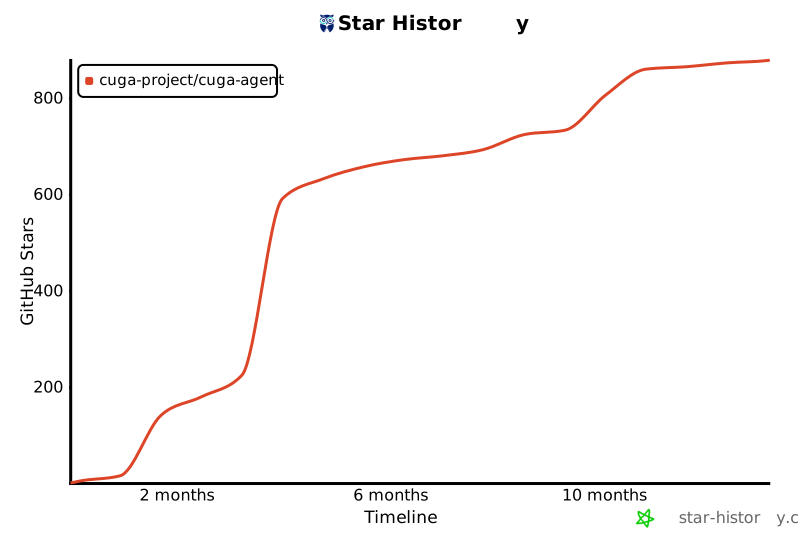](https://star-history.com/#cuga-project/cuga-agent&Date)
## Contributors
[](https://github.com/cuga-project/cuga-agent/graphs/contributors)
|